Everyone has a very high hope from the Apple latest flagship phone coming this year. As popularly known as iPhone 8 is going to be the game changer for the company and even for smartphone market worldwide.
Must Read:how to make a picture smaller on iphone
Must Read:copytrans review
The phone, set to launch this fall, will include a 5.8-inch OLED display, a virtual home button, and a front-facing 3D face scanner. The scanner will check a user’s identity in a matter of milliseconds, and could replace the fingerprint scanner as the secure yet speedy unlock method.
Developers have trawled through Apple’s firmware release and found a number of clues.
Must Read: Apple has downgraded iPhone 8 before the launch
Must Read: Apple has downgraded iPhone 8 before the launch
It supports payments
Developer Guilherme Rambo has discovered references to “Pearl,” the internal codename for the face scanner, that suggests the system will support payments. Apple Pay, introduced in 2014, allows users with an iPhone 6 or later to complete contactless payments at supported kiosks, while a later update enabled the feature for use inside apps.
It’s unclear how kiosk payments will work if the user needs to point the phone at their face, but Apple could build on the existing system that allows users to authenticate their fingerprint ahead of time by double pressing the home button while the phone is unlocked.
It supports multiple faces
This is key. If the face scanner wants to replace the fingerprint sensor, it needs to work with more than one face. The current scanner, introduced with the iPhone 5S back in 2013, supported multiple finger scans that were stored in the device’s secure enclave. Apple could use a similar system to allow multiple users to unlock the same device.
Must Read: iPhone 8 concept design which will blow your mind
Must Read: iPhone 8 concept design which will blow your mind
It supports third-party apps
iOS 8, launched in 2014, brought third party support to the fingerprint scanner. This means that a banking app, for example, can ask for a fingerprint scan even though the phone is already unlocked. This avoids unwanted intruders accessing apps while the phone is unlocked, and also provides an extra layer of security for those concerned about accidentally leaving the phone open on the side. Support for third-party apps suggests Apple is working to ensure the face scanner supports the same features as its predecessor.
It will support augmented reality
Apple is going all-in with augmented reality, where virtual objects are superimposed on the real world. iOS 11, the next major version of Apple’s iPhone software set to launch later this year, will include a new “ARKit” system that developers can use to create AR apps without developing the underpinnings from scratch.
Must Read: 8 iPhone & iPad features that will be added with iOS 11
Must Read: 8 iPhone & iPad features that will be added with iOS 11
Developer Steve Troughton-Smith has discovered Apple may be planning to include support for ARKit in the front-facing sensors.
It will stay silent while you’re looking at it
This one is interesting: the same infrared depth sensors used to scan the face may also be used to determine whether the user is looking at the device. If they are, the phone could mute incoming tones and alerts. This would make a welcome change from the current system, where the only ways to turn off sounds are either to switch on Do Not Disturb mode in the control center or to flip the ringer switch.
How to Unlock a Disabled iPhone with iCloud
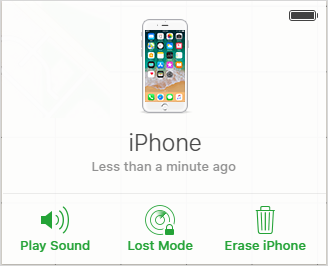
The common way of unlocking a disabled iPhone is via iTunes. However, this does not mean that there isn’t another way of having your disabled iPhone unlocked. If you do not want to unlock your disabled iPhone with iTunes, you can simply make use of “Find My iPhone” by just following these easy steps:
- Afterwards, go to Find iPhone section and click on the “All Devices” option. A list of all the devices that are connected to your Apple ID will be displayed. Pick the iOS device that has been disabled.
- Tap on Erase iPhone and confirm it.
- You should know that after you have been able to unlock your disabled iPhone, it will reset back to factory default settings and all data will be removed. Restoring iPhone is the only way to remove the screen lock from disabled iPhone.
How to Unlock Disabled iPhone without Losing Data
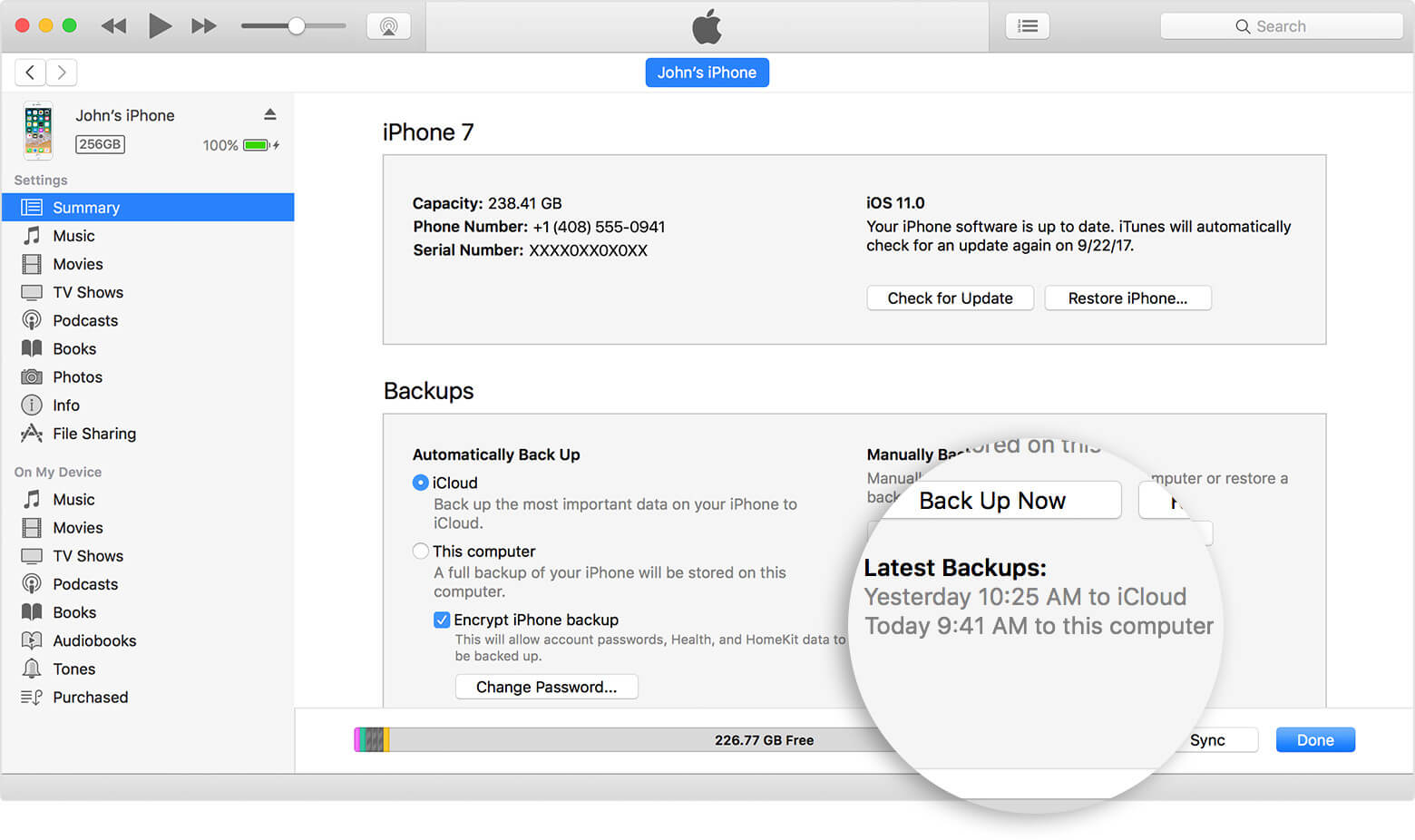
- Unlocking disabled iPhone will cause everything to be erased from iPhone. So don’t forget to backup your iPhone data before you reset it. But note that the only way to backup a disabled iPhone is using iTunes “Backup Up” feature. After you unlock your device, you can restore the backup to your iPhone.
Steps to Backup Disabled iPhone:
- Launch iTunes and connect your iPhone to the computer (You should have synced your iPhone with this computer before).
- Click on the device tab at the upper left corner on iTunes.
- You will be in the Summary window. Tap “Back Up Now” button to start the backup process.
- When the backup is completed, you can start to unlock your iPhone with/without iTunes.
- When you have unlocked your iPhone, connect your iPhone to this iTunes again and use the “Restore Backup” feature for your device. Gihosoft Free iPhone Data Recovery is a professional iPhone Data Recovery software to get back all your lost text message, photo, video, call history, note, contact and more from iPhone/iPad/iPod Touch.

No comments:
Post a Comment